
Docs
Import and export
Move translations between sites, hand them to a translator, bring a Weglot export along, and keep a staging copy from paying twice.
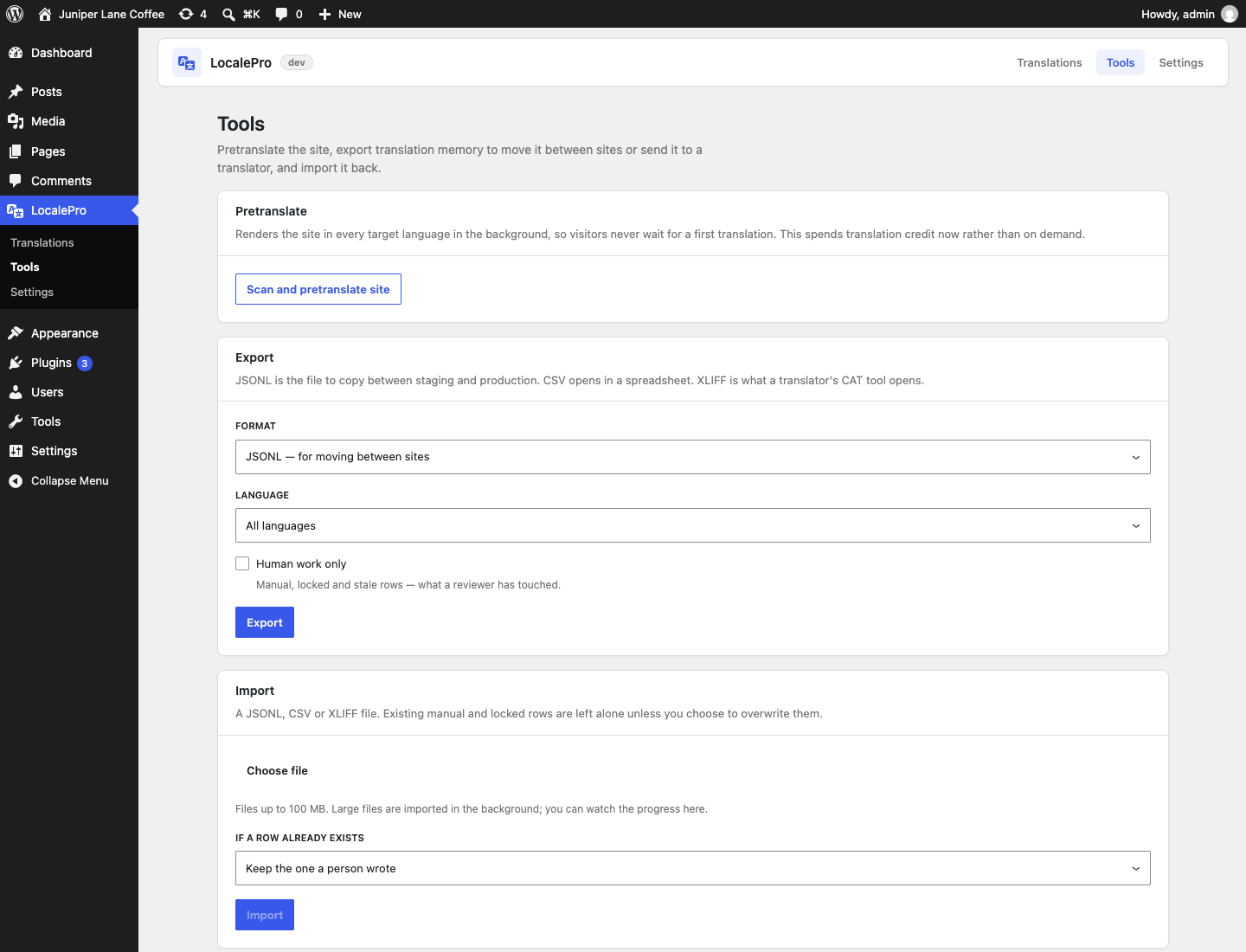
Pretranslate, export, and import are on LocalePro → Tools.
Every translated sentence LocalePro has paid for is stored in two tables in your database, wp_localepro_segments and wp_localepro_translations. That memory is the reason a second visit costs nothing, and the reason a database copy from staging to production should not cost anything either.
This page is how you move it, how you hand it to a translator, and how a sync that forgot it is repaired.
Where to find it
LocalePro → Tools has Export and Import. Export can be limited to one language, or to Human work only (manual, locked, and stale rows: what a reviewer has touched). Import takes a file and asks one question, If a row already exists: keep the one a person wrote, or replace it with the file. Large files are imported in the background, with a progress bar you can leave and come back to.
The same two operations are available as wp localepro memory export and import on the command line, and as GET /translations/export and POST /translations/import in the REST API.
Formats
| Format | Use it for |
|---|---|
| JSONL | Moving between sites. One object per line, header on line one. This is the file you copy from staging to production. |
| CSV | A spreadsheet. UTF-8 with a BOM so Excel opens it correctly. Unknown columns are ignored; an empty translation cell means “no change”, never a blanking. |
| XLIFF 1.2 | A professional translator’s tools. Inline markup (links, emphasis inside a sentence) travels as <g> and <x> tags. |
Each row carries the identity of the sentence it translates (source language, source text, and hash), so nothing depends on database ids, which differ from one site to the next.
A CSV row or XLIFF unit whose translation has lost its inline markers is rejected rather than stored, and counted as invalid in the report. A page would refuse it the same way; the spreadsheet or CAT tool is where those markers get put back.
The import report
Every import ends with the same five counts:
- Created: new translations.
- Updated: existing rows replaced.
- Left alone (protected): manual or locked rows the file would have changed, kept because you chose to keep a person’s work.
- Rehashed: rows whose stored hash no longer matched their text, usually after a
wp search-replaceon the exporting site. The recomputed hash is what gets stored, because that is what a page will ask for. - Skipped as invalid: rows that could not be stored. Each one gets a message saying why; the Tools screen keeps the first 200 messages, and the count is always exact.
Importing a Weglot export
A site leaving Weglot can bring its translations along. Weglot’s Translations → Export produces one XLIFF or CSV per language pair (en_es.xliff, en_es.csv). Either imports directly; there is no conversion step.
- Inline markup. Weglot numbers the links and emphasis inside a sentence its own way. The markers are rewritten on the way in, so a paragraph with a link in it matches the sentence LocalePro’s own reader finds on the page, and is served on the next visit.
- Quality. A Weglot unit marked Automatic lands as a machine translation. Anything else (Manual, Reviewed, Professional) lands as a manual translation and is locked, the same as a translation typed into LocalePro’s editor.
- CSV columns. Weglot writes semicolon-separated files with
language_from,language_to,word_from,word_to, andqualitycolumns. The separator is sniffed from the header and those names are recognized, as aretranslationandtargetfor a hand-built sheet. - Weglot’s own defects. A unit whose translation dropped or reordered a marker is reported and skipped. A page would have fallen back to the source text for it anyway.
Weglot’s row ids are not used; the identity is computed from the source text.
One difference to expect: Weglot unwraps a block whose whole content is a single link (<li><a>Donate</a></li> exports as plain Donate), where LocalePro keeps the link marker. Those few strings are translated afresh on first visit.
Staging to production
A sentence’s identity is a hash of its source language and its normalized source text. There is no domain, post id, or site salt in it, so a database copied to another host keeps every translation. It bills again only when one of these happens:
- The tables were not in the sync. Deploy tooling copies
wp_postsandwp_postmeta; custom tables that look like caches get excluded. Content arrives, memory does not, and the first crawl re-translates the site. wp search-replacerewrote the stored text but not the hashes. After a domain change, every sentence that contained a URL becomes unreachable, and the next page inserts a duplicate beside it.- The source language changed. The language is part of the hash. Staging on
enand production onen-gbshare nothing. - Failed rows travelled. A row marked failed has no usable text, so every page that needs it asks a provider again.
- Production keys rode along in the database. A copied database lets a laptop spend the production account. That guard is a separate setting; import and export do not cover it.
- The rendered text genuinely differs. A different theme, a staging banner, a new WordPress version produce new sentences. Those are new hashes, and they will be billed. That is correct.
Items 1, 2, and 4 are what export, import, and memory doctor close. Item 3 is what doctor diagnoses.
Playbook
-
Include both memory tables in every database copy:
wp_localepro_segmentsandwp_localepro_translations. They are not a cache. What is in them was paid for. -
Or move only the memory:
wp localepro memory export --file=tm.jsonl # copy tm.jsonl to production wp localepro memory import tm.jsonl -
Exclude LocalePro’s tables from
wp search-replace, or runwp localepro memory doctor --fixafterwards. A domain rewrite that touches the stored text without recomputing the hash is how a memory goes silent. -
Do not press Pretranslate on a non-production copy that still has production keys. The memory being present is not a reason to spend it again. Outside production LocalePro refuses provider calls by default; see usage and spend.
-
Clear failed rows before shipping a database, or they retry on the first production visit. The Translations screen can delete them;
doctortells you how many there are.
Handing work to a translator
Export as XLIFF for a translator who uses a CAT tool, or CSV for one who works in a spreadsheet. Limit it to one language, and to Human work only if they are reviewing rather than translating from scratch. Import their file back with Keep the one a person wrote unless their review is meant to replace earlier manual edits.
What comes back is stored as a person’s work when the file says so: an XLIFF target whose state is translated, final, or signed-off, or a value in a CSV manual column, lands as a manual translation and is locked, so the next automatic pass does not overwrite it. A CSV automatic column, or a bare translation column with no quality marker, stays machine output.