
Docs
AI refinement
Ask a language model to smooth translations you already have, using the AI provider connected in WordPress. Optional, and billed by that provider.
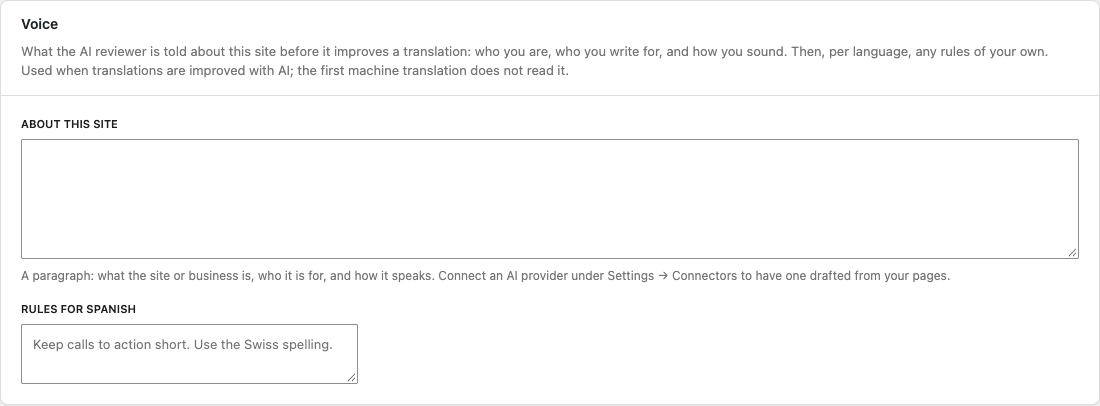
Who the site is, and any rules for one language. The model reads this when you ask it to improve a translation.
LocalePro translates with DeepL, Google, or Microsoft. A language model is slower and less predictable than those, so it is never in front of a visitor. Instead it is offered as a second look at translations that already exist: you point it at a page, it rewrites the machine output for tone and terminology, and the result replaces the stored translation.
This is optional. Nothing on this page runs unless you ask for it.
What it needs
LocalePro uses the WordPress AI Client that arrived in WordPress 7.0 (wp_ai_client_prompt). You connect an AI provider under Settings → Connectors, the same screen that holds your translation key, and WordPress runs the prompt. LocalePro never sees or stores the AI credential.
Any provider WordPress lists there that can generate text will do. If none is connected, the Improve with AI button does not appear, and the Voice card under LocalePro → Settings → Translation says to connect one.
Where to find it
- In the editor. The LocalePro panel in the block editor has an Improve with AI button for each language. It refines the translations already stored for that post, so save first if you want your latest edits included. Afterwards it reports how many were improved and how many were left alone.
- On the Translations screen. Improve with AI is an action on each row and in bulk. It is offered only for rows that can take it: automatic translations that nobody has edited or locked.
- Over REST.
POST /localepro/v1/posts/{id}/refinewith alocale, for anyone who can edit that post. See REST API.
What “improve this page” does
- The post’s title, excerpt, and content are rendered the way a visitor would see them, through the same
the_contentfilter the theme uses, so blocks and shortcodes produce the sentences that actually appear. - Those sentences are matched against your stored translations for the chosen language. Only the post’s own text is in scope; the header, footer, and sidebar are not touched from inside a post.
- Rows a person has edited, and rows that are locked, are skipped and counted as such.
- The rest go to the model in batches of up to 25. What comes back replaces the automatic translation, and the row records
wp-ai-clientas its provider. Page caches for that post are told to refresh. - A sentence the model drops, returns empty, or returns with its inline markers broken keeps the machine translation it already had. Those are counted as not improved.
Refinement only ever rewrites the automatic translation. A manual translation or a locked row is never overwritten, whichever way you start it.
What is sent to the model
Each request carries, for every sentence in the batch, the source text and its current translation, with the source and target language codes. The prompt also includes:
- The brand voice paragraph from the Voice card, if you wrote one.
- Your per-language instructions from the same card, up to 1,024 characters.
- The glossary terms for that language, so the model applies the same required translations DeepL does.
- The page title, for context.
- The tone you chose for that language, formal or informal, so the model does not undo what DeepL was told.
- Up to eight short translations a person on your site has already approved, as examples of how the site should sound. These are only included once there are at least three, and each side must be 200 characters or fewer.
The model is asked to return only the improved sentences, keyed by id, and to leave placeholders, markers, URLs, and email addresses untouched.
The Voice card is read only by this step. The first machine translation does not see it. A connected AI provider can also draft the brand voice paragraph from your site’s name, tagline, front page, and about page; you edit the draft before saving, and nothing is saved until you do.
What it costs
The AI provider bills you for every request, in whatever way that provider charges. LocalePro does not resell it, and refinement is never automatic for that reason: it costs money per sentence, and its output is a judgement call, so it runs when an editor asks for it, on the thing they are looking at.
Two honest limits:
- The monthly limit under Usage and spend counts characters sent to DeepL, Google, and Microsoft. It does not count AI refinement, and reaching it does not pause refinement.
- The This month usage table on the same tab does not include AI requests either. Your AI provider’s own dashboard is where that spend shows.
Turning it off
There is no separate switch inside LocalePro. The feature is available whenever WordPress has a text-capable AI provider connected, and absent otherwise. To remove it, disconnect the AI provider under Settings → Connectors; the Improve with AI button and the Translations screen action disappear.
Already-refined translations stay as they are. Use Regenerate on the Translations screen to replace one with a fresh machine translation.
Not the same thing: the background quality upgrade
LocalePro → Settings → Translation → Show advanced settings has a toggle labelled Upgrade fast translations in the background. It is sometimes confused with AI refinement, and it is a different mechanism:
- A page nobody has translated yet is translated in front of its first visitor, and that visitor has about three seconds, so DeepL is asked for its fast model. With this toggle on, those sentences go back to DeepL from a background job and are redone with DeepL’s slower, better model. The page improves on its next load.
- It uses DeepL, not the AI provider. It only touches rows DeepL’s fast model produced.
- It is off by default. Text first seen by a visitor is translated twice, so it roughly doubles what new content costs. Unlike AI refinement, it is governed by the monthly limit, and stops when the limit is reached.
- Jobs run on WordPress cron: about a minute after a language’s memory grows, in batches of 50, with a daily sweep for anything that was missed.
A neighbouring toggle, Prefer quality over speed on first view, asks for the better DeepL model while the visitor waits instead. If it runs out of time, the request falls to the next service, and the page shows the source text until the translation is stored.
Related
- Translation service, for the Tone setting and protected terms.
- Translations screen, for revert, lock, regenerate, and the bulk actions.
- Usage and spend, for the limit that applies to DeepL, Google, and Microsoft.